
Use "Keyword Researcher" to discover high-value Long-Tail Keywords from Google AutoComplete, Organize CSV files from the Google Keyword Planner, and write SEO-Optimized Articlesfor your website.
- How does a website make money
- How does a website work
- How does a website find my location
- How does a website server work
- how does a website help a business
Do you need to Organize Keywords and Import CSV Files from the Google Keyword Planner?
Would you like to manage keywords, and article content? Planning a Web Content Strategy?

The 6 Foundational Steps of SEO
This is where Search Engine Optimization begins.

| 
| 
| 
| 
| 
|
Step 1: Discover and Import Keywords |  |
 .
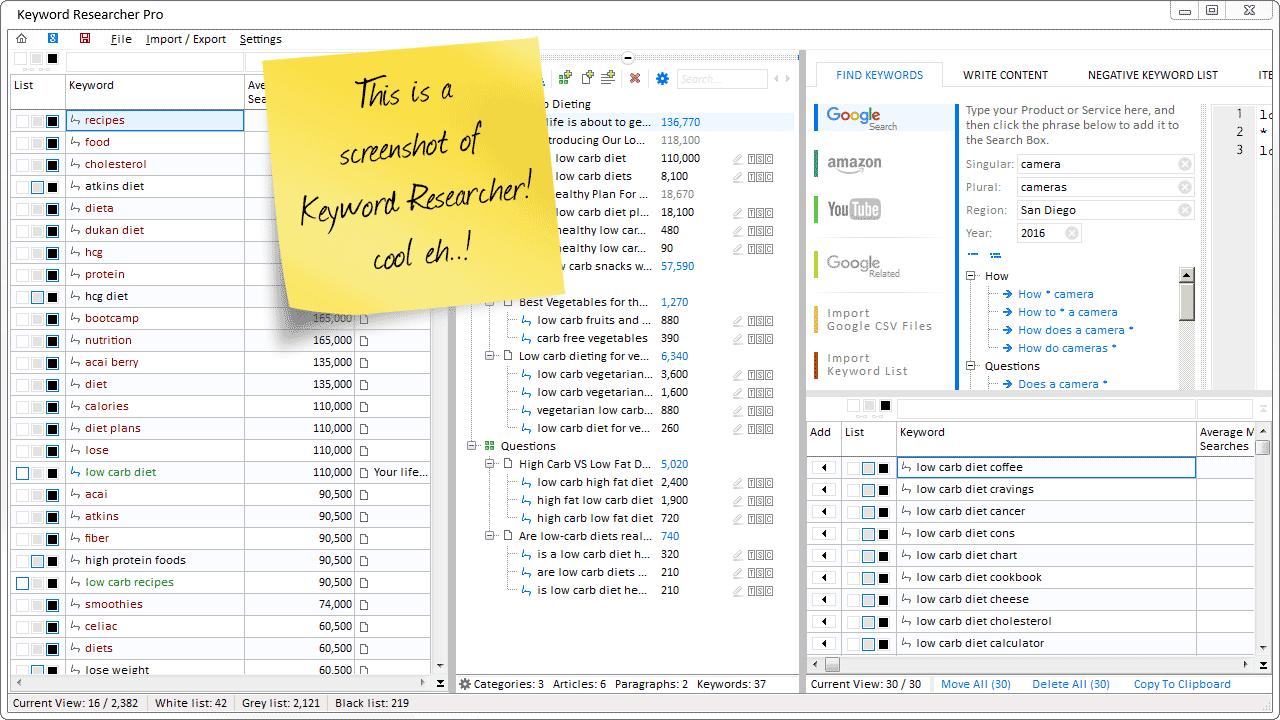
Keyword Researcher Screenshots
Yes, this is what Keyword Researcher looks like.
 |        |  |
Keyword Researcher
List of Features
 Search Google |  Search Amazon |  Search YouTube |
 Write SEO-Optimized Content |  Plan a Content Strategy |  Negative Keyword List |
 Advanced Keyword Search |  Assign your Keywords to a White, Grey, and Black List |  Keyword Tags |
 Import Google Keyword Planner Files |  Import from Microsoft Excel |  Export to CSV and XLS |
Table of Contents


Content Strategy Basics
Create and deploy keyword-optimized content.
1. What is a Content Strategy and why is it important?
- First, the SEO guy (sometimes pretentiously called the "Content Strategist") will examine a body of keyword data, and select the keywords which he feels are conducive to the marketing of the product that the website caters to.
- Then, a lot of time, money, and effort are attributed to "Content Writers" ("Content Developers") who create articles that satisfy (or partially satisfy) the spirit of the user's search query.
- In a product-based web business model (e.g. a company selling baby toys or video courses), the site owner hopes that a visitor will serendipitously stumble upon his website, and, will be so impressed by the images, video, or content that he will ultimately become a paying customer.
- In an advertising web business model (e.g. a magazine or blog), the site owner hopes to attract as many visitors as possible to his website. Because he knows that some percentage of these visitors will view an advertisement or (even better) click on an ad. The more clicks our site owner gets, the more money he makes.
2. Finding Keywords
- The Keyword Search Volume (The number of times the keyword is queried per month)
- The Keyword Cost-Per-Click (The approximate amount that an Adwords publisher is paying--when his ad is displayed for this keyword.
- What types products or services people are searching for
- The exact phrasing that people are using to search for products or services
- And, how many people are searching for these products or services
3. Selecting the right keywords for your website.

- Does the product or service I sell solve this person's problem?
- Am I the answer to this person's question?
- Do I personally know how to answer this user's question?
- Can I ascertain what this user is looking for, based on the keyword phrase itself?
- Can I create content for this query that will leave the user satisfied that they have completed their search successfully?
- Do I have experience with people asking this question?
4. Plan a Content Strategy and Cluster your keywords.

- how to organize keywords
- organize keywords for a website
- arrange website keywords
- keyword organization
- Keyword Researcher software
- hire a web content writer
- get a job as a web content writer
- or to simply learn more about web content writing itself
5. Create your article titles
6. Write your article and use your keywords in the article content.

Let's list a few ways you might
use the app in your business.
 |
 |
 |
 |
 |
Plan a Content Strategy with Keyword Researcher?
Turn unorganized keyword data into
real, actionable content.
 |
 |
 |
 |
 |
Comments
Post a Comment